
Archival giclée printing for photographers & fine artists
Home » FAQ
Frequently asked questions
Everything you need to know about preparing files, choosing papers, and ordering archival prints. Still have a question? Call Bill at 445-293-1175.
The best image format preferred is Tiff (.tif), flattened layers to preserve the largest color range. If need be you can send me a jpg with no compression preferred to keep the full color gamut intact.
We also accept most file formats such as: PNG, PSD, AI, EPS and PDF.
When you have finished editing and setting up your image files, you should Zip all them together into one compressed folder (.zip). Try to send via email to [email protected]. But client images are usually of a large mb size due to image dimensions, then use WeTransfer.
The basic WeTransfer is a free service and you get up to 3GB to send. The email to send to (in WeTransfer) is [email protected]. See File Uploads.
The best resolution for archival printing is to have the image(s) as 300dpi at 100% the file document size. Larger dpi than that is overkill and unnecessary.
Most pro photographers use the RAW setting when shooting images. For printing you should always try to use Adobe RGB for the largest print color range (gamut). You will get the most color from your file. The second most popular color space is sRGB.
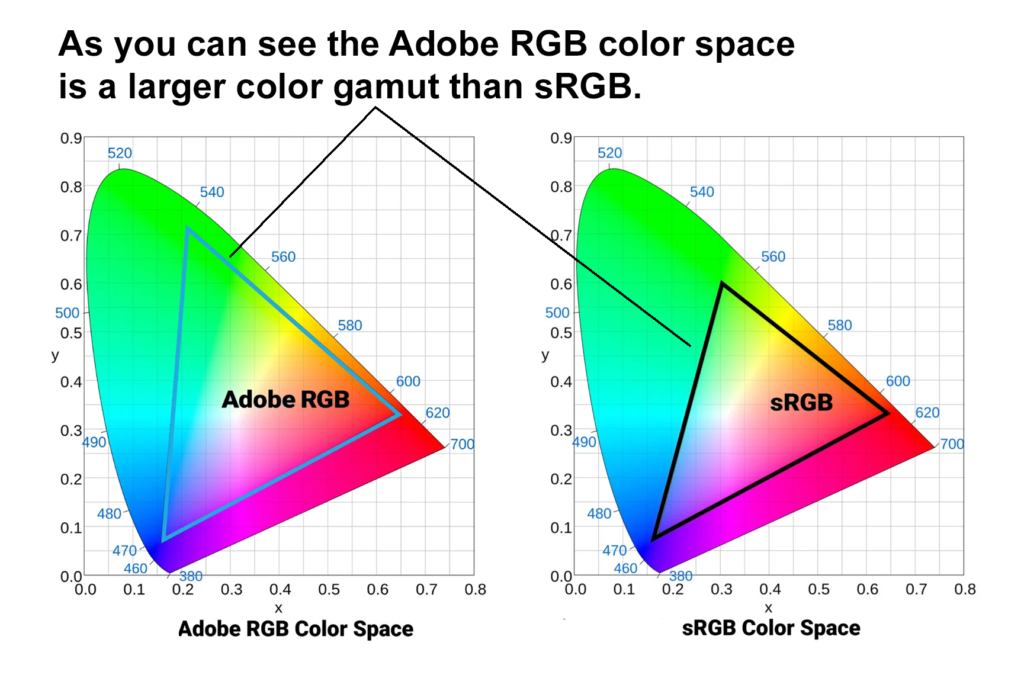
Check out this helpful video discussing color workflow: Adobe RGB vs sRGB: What Photographers Need to Know. For the full story, read our color spaces guide.
Video for correctly embedding RGB profile in Photoshop: Embedding a color profile in Photoshop (YouTube).
All clients should use a professionally color calibrated monitor to ensure color accuracy. PLUS you should always soft proof your editing with ICC Profiles. My ICC Profiles are available for download under the navigation menu: Resources › ICC Profiles.
Colors like electric green (or other extremely vibrant colors) will translate on your screen to the optimum correct ‘print color’ so you can assess the colors and edit accordingly. Remember you’re looking at an RGB backlit image that needs to be translated to what the print will look like on paper. Soft Proofing the image, using the icc profile that represents the printer device used and the paper selected is the best way to assure ‘what you see is what you get’.
Prints can be printed with an additional 1/4″ white border for free, so you can slide your prints perfectly under a frame mat. Choose no border if your print is going directly into a frame without a mat. If you want a border or no white border (cut flush) please specify in your order form and order message for borders or not.

Absolutely. We do this often. We can print the entire image (full frame), reduced to fit on an 8″x10″ identical paper. The fee is $9.00 for premium papers and $15.00 for Specialty Papers. Please allow 1-3 days for proof turnaround.
At Bucks Photo we can scan photos and artwork on paper or thin board up to 11″x17″. We send a digital proof to view and approve before any printing (if required). For larger scans we would recommend using a professional photographer with a 50 to 100 megapixel camera for the best detail and reproduction.
We can print up to 24″ by any length you desire. Such as 24″x36″ or other longer measurement.
Our Giclée prints are designed to be highly archival and can last anywhere from 50 to 200+ years without noticeable fading. Their exact lifespan depends heavily on display conditions and the materials used:
Factors Affecting Longevity: The longevity of a giclée print hinges on two main elements:
Tips to Maximize the Lifespan: To ensure your print lasts for generations:
You can place your order by using the convenient Order Form and by entering your name, etc. and specific print ordering information. Even leave notes for us in the message section in the lower right corner of the form. Please click Submit when done and then send your zipped images via WeTransfer to [email protected].
The best method for payment is via Credit Card with our Secure Order Form Submission. You can also use Venmo (@bill-nyman-photo), Zelle (445-293-1175), PayPal ([email protected]), or cash. See payment options.
Your digital files that are ‘print-ready’ take about 1-3 days. Scanning takes about the same. Scanning and printing takes about 3-5 days.
Prints are supplied and ready for pickup with each print individually encased in clear protective archival sleeves, and then grouped together between 2 stiff cardboard layers so prints don’t bend in transit.
Not sure about pixels vs. inches, resolution, or the best paper? Call 445-293-1175 and ask for Bill Nyman — your print consultation is always included.